
Night photography can be particularly challenging for everyday smartphone users. Capturing clear and vibrant portraits in low light often produces disappointing results, with dark faces, grainy textures, and washed-out colors. Many of these issues stem from technical limitations in the phone’s camera system rather than the photographer’s skill. Understanding how sensor size, lens speed, software processing, and lighting conditions interact can help improve night photography. Simple adjustments and awareness of these constraints can make a noticeable difference in daily photography. In this article, practical explanations and solutions for better night portraits will be explored.
Phone Hardware Can’t Capture Enough Light
Small Sensors Create Grainy Dark Photos
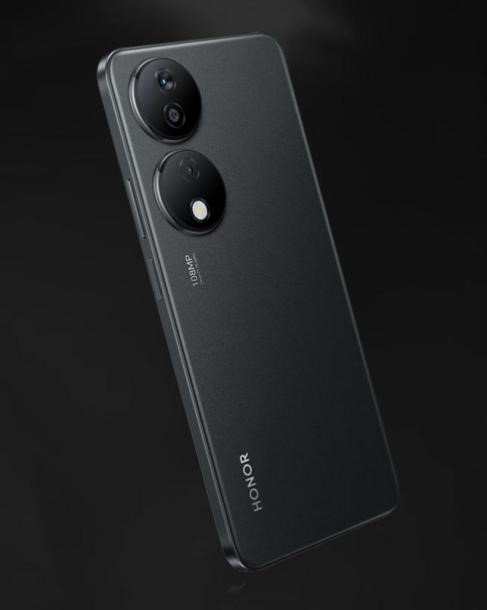
Smartphone cameras have small sensors compared to dedicated cameras, limiting their ability to gather light. In low-light conditions, this results in dark and grainy images, with noise obscuring facial details and textures. Even with increased ISO settings, small sensors struggle to produce clean photos without introducing artifacts. Users often notice these issues when shooting indoors or on dimly lit streets. Larger sensors or advanced optics can collect more light, improving image quality significantly. Devices like the HONOR X7b Smartphone, equipped with a 108MP high-resolution main camera, can capture more details in both day and night settings, making low-light portraits clearer and more vibrant without relying heavily on artificial lighting.
Slow Lenses Reduce Light Entry
Lenses with narrow apertures limit the amount of light reaching the sensor, which directly affects exposure. A slow lens can require longer shutter times, making handheld shots prone to blur. Nighttime portraits often appear underexposed unless the phone compensates with higher ISO, which increases noise. Some phones attempt digital enhancement to brighten images, but this can further degrade quality. Users may notice that even steady hands cannot prevent motion blur in low-light scenarios. Understanding the limitations of lens speed helps set realistic expectations and guides decisions for complementary lighting or stabilization techniques.

Auto Mode Prioritizes Speed Over Quality
Auto camera modes prioritize capturing an image quickly rather than optimizing exposure or detail. In low-light settings, the software may increase shutter speed to avoid blur, sacrificing brightness. Simultaneously, the camera may reduce resolution or apply noise reduction aggressively, further diminishing image quality. Users often assume the camera is underperforming, when in fact it is prioritizing speed over clarity. Recognizing this trade-off helps photographers adjust settings manually for better results. Manual controls in pro or night modes allow balancing shutter speed, ISO, and focus to capture more accurate low-light portraits.
Night Mode Has Specific Limitations
Needs Absolute Stillness to Work Well
Night mode typically combines multiple exposures to produce a brighter image. Any movement from the subject or photographer can cause ghosting or blur. This is particularly challenging when photographing people, who rarely remain perfectly still. Tripods or placing the phone on a stable surface can reduce these issues. Users may find that even slight hand tremors compromise the final photo. Understanding this requirement encourages strategies such as timed shots or leaning on surfaces for stability to improve outcomes.
Can Struggle with Moving Subjects
Moving subjects during long exposures in night mode can create motion blur or fragmented images. Street scenes or candid portraits often include subtle movements that are amplified in low-light photography. Cameras may attempt to compensate digitally, but this often results in unnatural artifacts or smeared highlights. Slower shutter speeds may capture motion as streaks rather than sharp subjects. Users should anticipate these limitations and choose either faster modes or additional light sources when photographing dynamic scenes. Awareness of this constraint allows better planning for low-light photography without relying solely on software correction.
Image Processing Often Overcorrects
Noise Reduction Washes Out Details
To combat grain in dark photos, software often applies aggressive noise reduction. While this reduces visible speckles, it can also remove fine details from hair, skin, and clothing. Portraits may appear flat or overly smooth, lacking texture and depth. Users might notice that faces look unnatural under dim lighting. Balancing noise reduction with retention of essential details is crucial for realistic results. Understanding this trade-off helps in choosing the correct mode or applying selective post-processing for the best effect.
HDR Blending Can Create Uneven Exposure
High Dynamic Range (HDR) processing combines multiple exposures to balance highlights and shadows. In night settings, uneven lighting or bright artificial lights can confuse HDR algorithms. This may result in inconsistent exposure across the photo, with some areas appearing too bright and others too dark. Users often find that the image does not represent the scene accurately. Knowing how HDR interacts with low-light conditions helps in choosing when to enable or disable it. Proper use of HDR can enhance portraits without creating distracting inconsistencies.
Practical Solutions for Better Results
Use External Light Sources Strategically
Adding even small amounts of light can drastically improve low-light portraits. Portable LED lights, phone flash, or nearby streetlights can brighten faces and reduce noise. Placing the light at an angle can create depth and enhance facial features. Users should avoid direct overhead lighting that may produce harsh shadows. Experimenting with different positions and intensities allows creative control over the final photo. Simple lighting adjustments often produce more significant improvements than software alone.
Learn Your Phone’s Pro Mode Settings
Pro or manual modes allow control over shutter speed, ISO, and focus, which are critical in low-light scenarios. Users can slow the shutter to gather more light while balancing ISO to minimize noise. Manual focus ensures that the subject remains sharp, even in challenging conditions. Understanding these settings empowers users to capture night portraits more reliably. Regular practice in low-light conditions builds familiarity with the phone’s limits and strengths. Optimizing pro mode parameters leads to more consistent and visually appealing results.
Shoot in RAW for Better Editing Flexibility
Shooting in RAW format preserves more data than standard JPEG images, providing greater flexibility for post-processing. Users can adjust exposure, white balance, and shadows without degrading image quality. RAW files allow recovery of details lost in automatic processing. While editing requires additional software, the results can be significantly better than relying solely on in-camera enhancements. For casual night photography, capturing RAW files ensures more professional-looking final images. Even minor adjustments can transform underexposed photos into visually striking portraits.
Conclusion
Nighttime photography challenges us to see beyond darkness, not just through better hardware, but through a deeper understanding of light itself. By recognizing how our devices interpret shadows and highlights, we can make intentional choices—with lighting, settings, and composition—that bring out clarity and emotion, even in low light. Ultimately, the best night portraits are created not only by the camera we hold, but by the way we learn to see with it.